Admissions open for classroom and online training. ENROLL NOW.


Future of 3D Design using 3DEXPERIENCE SOLIDWORKS
3DEXPERIENCE SOLIDWORKS Online Training with CSWA Certification & 3 Months License
Future of 3D Design using 3DEXPERIENCE SOLIDWORKS
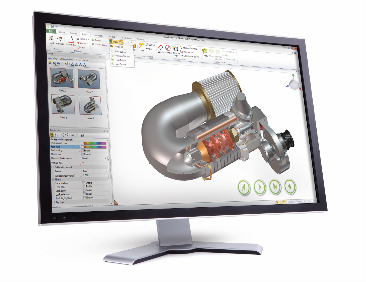
This course covers the future of 3D design using 3DEXPERIENCE SOLIDWORKS, a powerful combination of desktop CAD and cloud collaboration.
Upon successful completion of this training, you will be able to:
-
Create 2D sketches
-
Design parametric 3D parts
-
Build complex assemblies
-
Generate engineering drawings
-
Manage CAD data using the 3DEXPERIENCE cloud platform
At the end of the course, participants will be eligible to appear for the Certified SOLIDWORKS Associate (CSWA) examination
IFS Academy provides:
-
3 Months License of 3DEXPERIENCE SOLIDWORKS
-
Free CSWA Exam Voucher
-
Instructor-led Live Online Training
-
Industry-Oriented Assignments & Practice Tests
Our structured training program prepares you thoroughly for the CSWA certification examination.
What is the 3DEXPERIENCE Platform?
The 3DEXPERIENCE® platform, developed by Dassault Systèmes, is a cloud-based innovation platform that provides organizations with a real-time, collaborative product development environment.
It connects people, ideas, data, and solutions in a unified digital ecosystem. The platform extends the capabilities of SOLIDWORKS® by enabling seamless collaboration, cloud data management, and secure file sharing.
What is 3DEXPERIENCE SOLIDWORKS?
3DEXPERIENCE SOLIDWORKS connects traditional desktop-installed SOLIDWORKS 3D CAD with the cloud-based 3DEXPERIENCE platform.
It enables:
-
Secure cloud data management (ENOVIA-based system)
-
Real-time team collaboration
-
CAD-aware storage that maintains file references
-
Access to project data from any device
-
Simplified product lifecycle management (PLM)
This integration helps companies streamline design workflows and improve team productivity.
SOLIDWORKS Desktop vs 3DEXPERIENCE SOLIDWORKS
| Feature | SOLIDWORKS Desktop | 3DEXPERIENCE SOLIDWORKS |
|---|---|---|
| Installation | Local computer | Desktop + Cloud connection |
| Data Storage | Local / Network drive | Secure cloud storage |
| Collaboration | Limited | Real-time collaboration |
| Data Management | Manual | Built-in cloud data management |
| Licensing | Perpetual / Term | Subscription-based |
| Updates | Manual updates | Automatic updates |
Schedule: Monthly batches available. Exact start dates and timings will be shared by our counselors after enquiry.
Duration: 40 Hrs. including Lectures & Practicals
Fees:
-
INR 16000 per Participant for Working Professionals.
-
USD 265 for foreign internationals
-
INR 5000 per Participant for College Undergraduate Students with valid ID card for a minimum group of 30 Students.
Mode of Training: Instructor-Led Online Live Training

Why IFS Academy
-
Industry-experienced trainers
-
Authorized ecosystem alignment
-
Proven certification success
-
Affordable pricing with license included
Have Any Doubts About the Course? Talk With Our Career Counselor.
Career Outcomes
-
Mechanical Design Engineer
-
CAD Engineer
-
Product Design Engineer
-
CSWA Certified Associate
What’s Included
-
Course Completion Certificate from IFS Academy
-
3 Months Access to 3DEXPERIENCE SOLIDWORKS Software
-
Free CSWA Exam Voucher for all Participants along with technical guidance for preparing the exam
-
Access to EDUPASSCE Learning Material
Download the Syllabus To View the Whole Course Outline and Learning Objectives.
About Certified SolidWorks Associate (CSWA)
The Certified SolidWorks Associate (CSWA) Certification Program provides the skills students need to work in the design and engineering fields. Successfully passing the CSWA Exam assessment proves competency in 3D CAD modeling technology, application of engineering principles, and recognition of global industry practices.
Description
In this learning module you will enhance your SOLIDWORKS skill by solving various CAD problem statements to prepare for the Certified SOLIDWORKS Associate Exam (CSWA)! Learning is designed for in class assignments as well as users that want to learn more on their own. You will create sketches to apply various features like extruded bosses, cuts, revolves and sweep. You will also define mates to create assemblies of parts. Participants shall receive 3 Months 3DEXPERIENCE SOLIDWORKS official license which can be installed on their personal laptops along with free CSWA voucher.
Objectives
Upon completion of this learning module, you will be able to:
-
Create and modify sketch profile, Global Variables & Reference Geometries
-
Apply and modify various material addition and removal features
-
Create and modify Linear and Circular Patterns
-
Create Assemblies & Mates
-
Appear for CSWA Exam
Course Contents
-
Introduction to the 3DEXPERIENCE Platform
-
Create 3DEXPERIENCE ID and connect to 3DEXPERIENCE platform
-
3DEXPERIENCE Platform Navigation
-
Collaborative Space Management
-
Creating & Managing CAD Data on the Platform
-
Introduction to 3DEXPERIENCE SOLIDWORKS Interface
-
Access 3DEXPERIENCE Edu | Academics community to get support
-
Create, Extrude sketch profiles
-
Create sketch fillets/chamfers
-
Convert & Offset Entities
-
Using mirror command
-
Create and use Global Variables and Equation
-
Use start & end conditions for extrude boss
-
Create fillets/chamfers
-
Convert & Offset Entities
-
Use start & end conditions for extrude boss
-
Create linear sketch patterns
-
Create circular sketch patterns
-
Create reference planes and axes
-
Create slots in the sketch profile
-
Create extruded cuts
-
Apply fillets/chamfers
-
Create revolve boss
-
Apply revolve cut
-
Create mirror feature
-
Apply linear pattern
-
Apply circular pattern
-
Create sweep boss/cut
-
Create an assembly
-
Create mates in an assembly
-
Create 3D objects from 2D sketch
Register Now & Get Discount. Only Limited Seats Available. Grab The Offer Now.
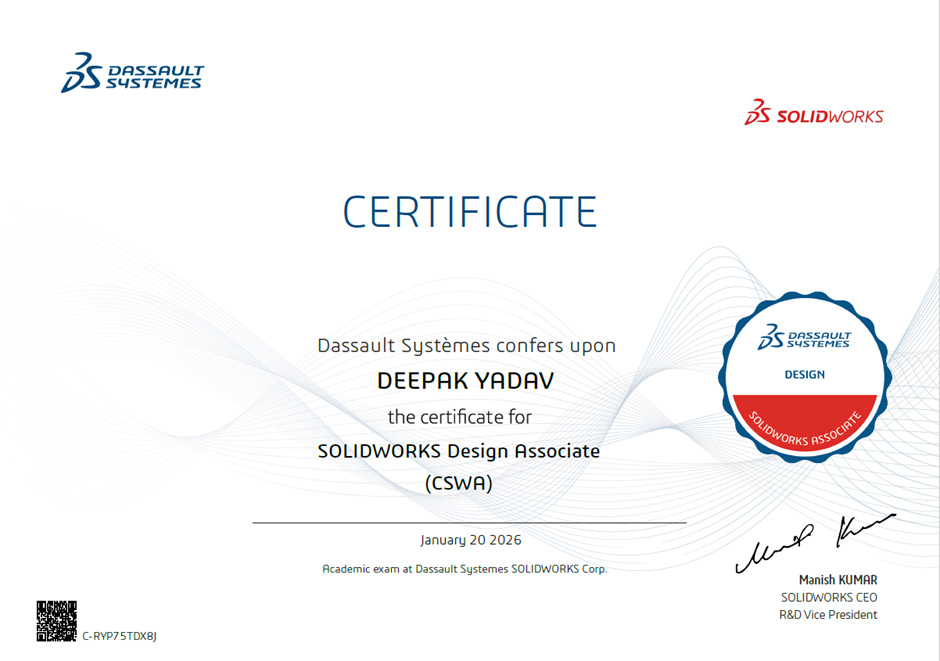
CSWA Sample Certificate
Participants shall receive this certificate only after successfully completing passing the CSWA examination.
Who Can Join
-
SE to BE Mechanical, Automobile, Automation & Robotics Engineering Students
-
Fresh pass-out students from Mechanical, Automobile, Automation & Robotics branches
-
Working Professionals
Enroll Now – Limited Seats!

Note
-
In case of Working Professionals, if the payment is done by their company then GST shall be charged extra at actual.
-
In case of colleges who wish to have the 3DEXPERINCE Software licenses on their name and wish to install them in college laboratories, GST of 18% shall be charged on the total payment.
Contact Us
+91-98228 49628 / 99224 40102
Email: training@ifsacademy.org

Frequently Asked Questions (FAQs)
3DEXPERIENCE SOLIDWORKS is the cloud-enabled version of SOLIDWORKS
offered by Dassault Systèmes, integrating powerful 3D CAD design tools
with the 3DEXPERIENCE platform for collaboration, data management, and
innovation.
Yes. Participants receive 3 Months official 3DEXPERIENCE SOLIDWORKS
license, access to EDUSPACE learning resources, and CSWA exam voucher,
aligned with Dassault Systèmes’ academic and certification ecosystem.
The course duration is 40 hours, including instructor-led lectures and
hands-on practical sessions conducted live online.
Yes. This course is designed for students, fresh graduates, and working
professionals, starting from fundamentals and progressing toward CSWA
exam readiness.
Yes. Every participant receives a 3-Months official 3DEXPERIENCE
SOLIDWORKS
license, which can be installed on their personal laptop.
Yes. A free CSWA exam voucher is included along with technical guidance
and exam preparation support.
-
IFS Academy Course Completion Certificate
-
CSWA Certification (after successfully clearing the exam)
Access to EDUSPACE is free. Recording access to Instructor-Led Online
Training is paid and shall be charged extra.
Yes. CSWA certification and hands-on 3DEXPERIENCE exposure significantly
improve employability in mechanical design, CAD, and product development
roles.
3DEXPERIENCE SOLIDWORKS offers:
-
Cloud-based collaboration
-
Secure data management
-
Anywhere access
-
Industry-standard workflows used by global OEMs
Ready to Master 3DEXPERIENCE SOLIDWORKS?
Enroll today for monthly batches, Software access, and a completion
certificate.
3DEXPERIENCE SOLIDWORKS is the cloud-enabled version of SOLIDWORKS offered by Dassault Systèmes, integrating powerful 3D CAD design tools with the 3DEXPERIENCE platform for collaboration, data management, and innovation.
Yes. Participants receive 3 Months official 3DEXPERIENCE SOLIDWORKS license, access to EDUSPACE learning resources, and CSWA exam voucher, aligned with Dassault Systèmes’ academic and certification ecosystem.
The course duration is 40 hours, including instructor-led lectures and hands-on practical sessions conducted live online.
Yes. This course is designed for students, fresh graduates, and working professionals, starting from fundamentals and progressing toward CSWA exam readiness.
Yes. Every participant receives a 3-Months official 3DEXPERIENCE SOLIDWORKS license, which can be installed on their personal laptop.
Yes. A free CSWA exam voucher is included along with technical guidance and exam preparation support.
-
IFS Academy Course Completion Certificate
-
CSWA Certification (after successfully clearing the exam)
Access to EDUSPACE is free. Recording access to Instructor-Led Online Training is paid and shall be charged extra.
Yes. CSWA certification and hands-on 3DEXPERIENCE exposure significantly improve employability in mechanical design, CAD, and product development roles.
3DEXPERIENCE SOLIDWORKS offers:
-
Cloud-based collaboration
-
Secure data management
-
Anywhere access
-
Industry-standard workflows used by global OEMs
Ready to Master 3DEXPERIENCE SOLIDWORKS?
Enroll today for monthly batches, Software access, and a completion certificate.
Admission / Registration Procedure:
Students are requested to complete their admission / registration formalities and pay the course fees by clicking on the Apply Now button given below.